Role
Product Designer
UX/UI, product strategy, IA, visual system
German Losada
UX/UI Case Study
AI Vehicle Customization SaaS Dashboard
A premium AI-powered SaaS platform that helps car owners and automotive shops visualize realistic customization concepts before committing to wraps, paint, rims, body kits, decals, lights, and carbon fiber upgrades.
Role
Product Designer
UX/UI, product strategy, IA, visual system
Timeline
8 weeks
Discovery, flows, interface design, prototype
Team
Solo concept
End-to-end product design case study
Tools
Figma, FigJam, AI tools
Wireframes, dashboard UI, design system
AI previews
Real vehicle
Shop mode
B2B workflow
Credits
SaaS model
Project overview
AutoVision AI connects consumer creativity with professional automotive workflows. Users can move from inspiration to realistic preview, while shops can turn those previews into clearer client conversations and faster service decisions.
Car owners can upload their actual vehicle, describe a desired build, and generate realistic previews before committing to expensive modifications.
Wrap shops, paint studios, detailers, and custom garages can use AI previews to guide consultations, present concepts, and move clients toward quotes faster.
A credit-based platform supports individual enthusiasts while scaling into shop seats, client libraries, branded galleries, and quote-ready project workflows.
Problem
The core design challenge was reducing uncertainty. The product needed to help users explore ambitious ideas while giving shops a practical way to turn those ideas into credible presentations.
Customers struggle to imagine paint, wraps, rims, lighting, decals, or body kits on their exact vehicle.
Shops lose time explaining ideas with reference images, basic mockups, or verbal descriptions that do not build enough confidence.
Traditional configurators are limited to generic models and rarely match real vehicle angles, lighting, paint condition, or aftermarket combinations.
The path from inspiration to purchase has too much friction: users browse ideas, hesitate, ask for opinions, and delay service decisions.
High-value modifications require trust before payment, especially when the final result is visual, personal, and hard to reverse.
Goals and objectives
The experience needed to feel advanced without becoming intimidating. Every major flow was designed to make the next step obvious and keep the user's vehicle at the center of the decision.
Improve confidence before purchase by showing realistic concepts on the user's own vehicle.
Reduce friction with a guided customization workflow that makes AI generation feel approachable.
Help shops present concepts faster during consultations and follow-up conversations.
Support both creative exploration and controlled business workflows inside one SaaS product.
Make a technically advanced AI tool feel premium, simple, and reliable.
Use saved projects and galleries to encourage iteration, comparison, and conversion.
Research and insights
I compared automotive configurators, design tools, aftermarket shopping flows, and AI image workflows. The strongest opportunity was a guided experience that preserved realism while making exploration fast.
Users are more likely to act when the preview preserves vehicle identity, angle, shadows, and context instead of producing a generic fantasy render.
Paint finish, rim style, wrap color, decals, lighting, and body kits create many combinations. The interface needs to sequence choices without reducing creative control.
Business users need saved client builds, project notes, quote context, and reusable inspiration to reduce repeated consultation work.
AI image tools are powerful but inconsistent for non-experts. Structured controls and examples help users write better prompts without learning prompt engineering.
Information architecture
The architecture separates consumer exploration from business operations while keeping both inside the same SaaS platform.
Landing page
Dashboard
New build flow
My Garage
AI Gallery
Billing
Shop Mode
Before/After results
User flow
The flow is linear where users need guidance and flexible where users need comparison, saving, sharing, or shop support.
01
Discover product
02
Sign in
03
Open dashboard
04
Start new build
05
Upload vehicle image
06
Add vehicle details
07
Choose customization types
08
Build AI prompt
09
Review and generate
10
Compare before/after
11
Save to garage or share
12
Use shop features
Key screens
The screens below form the main case study story: dashboard orientation, guided generation, visual result comparison, project organization, inspiration, and business workflows.
New Build Wizard
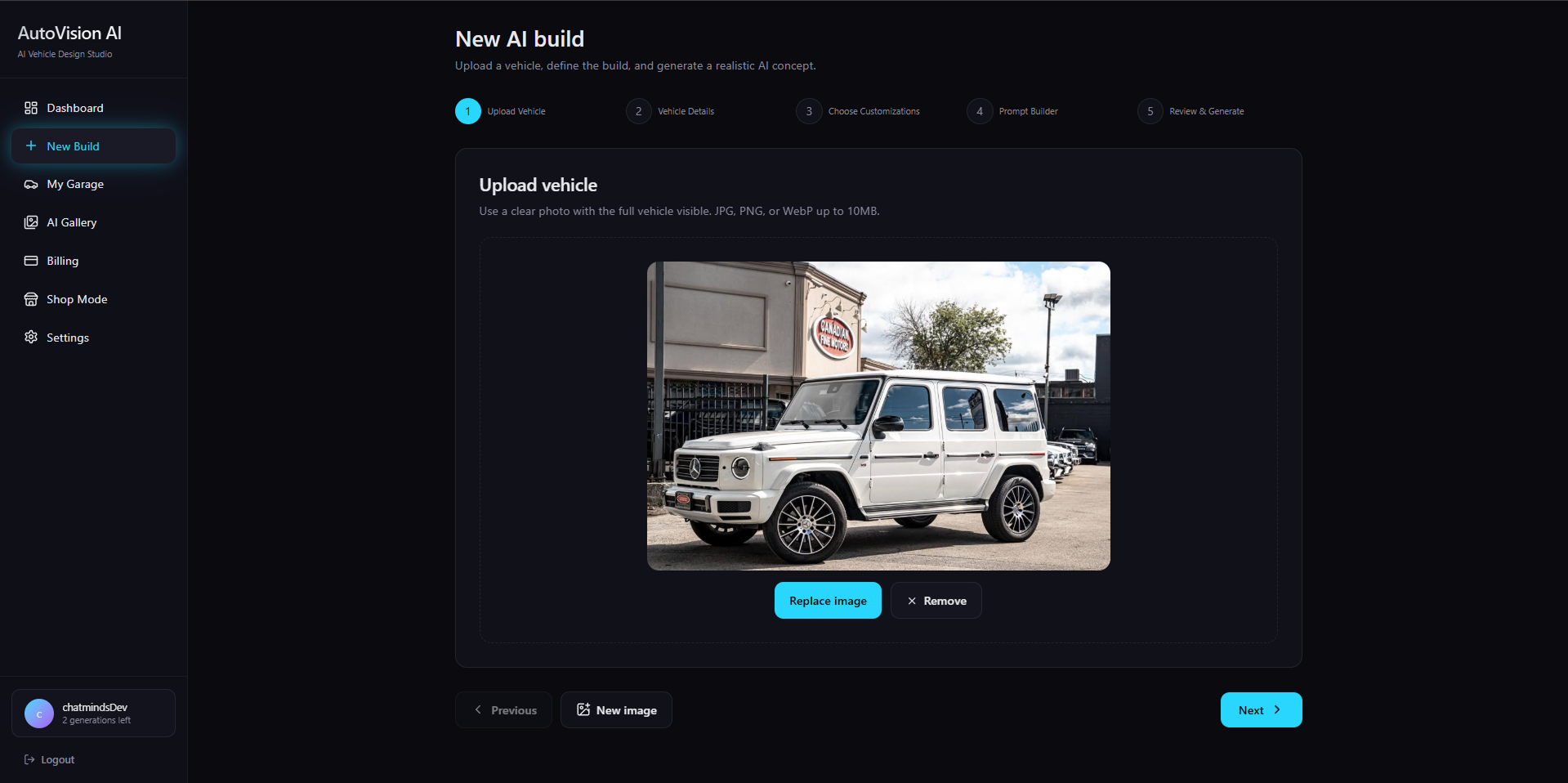
Step 1
The first step anchors the workflow around the user's real vehicle, making the output personal and trustworthy from the start.
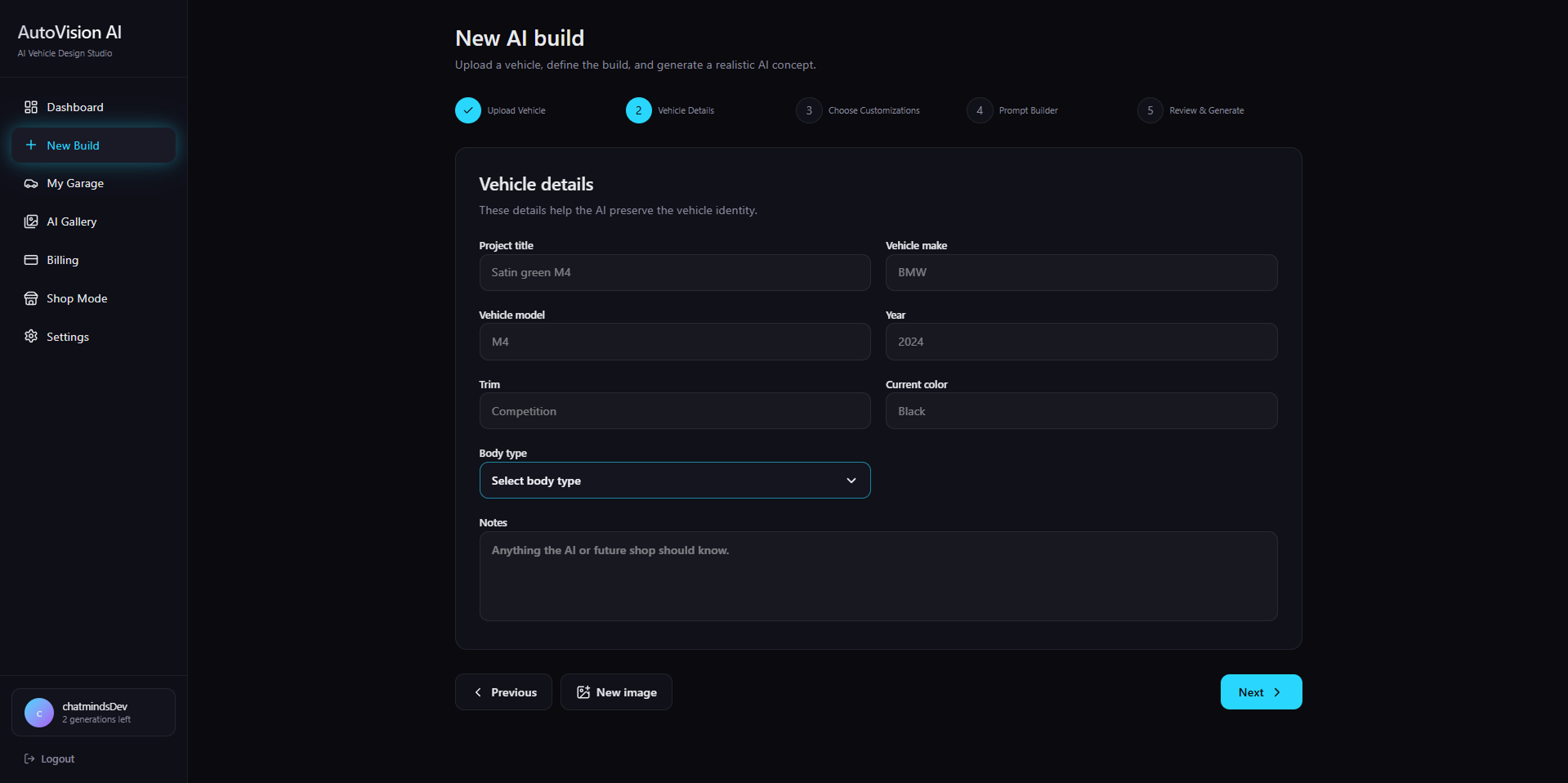
Step 2
Make, model, year, angle, and current condition add context for more believable generation and cleaner project records.
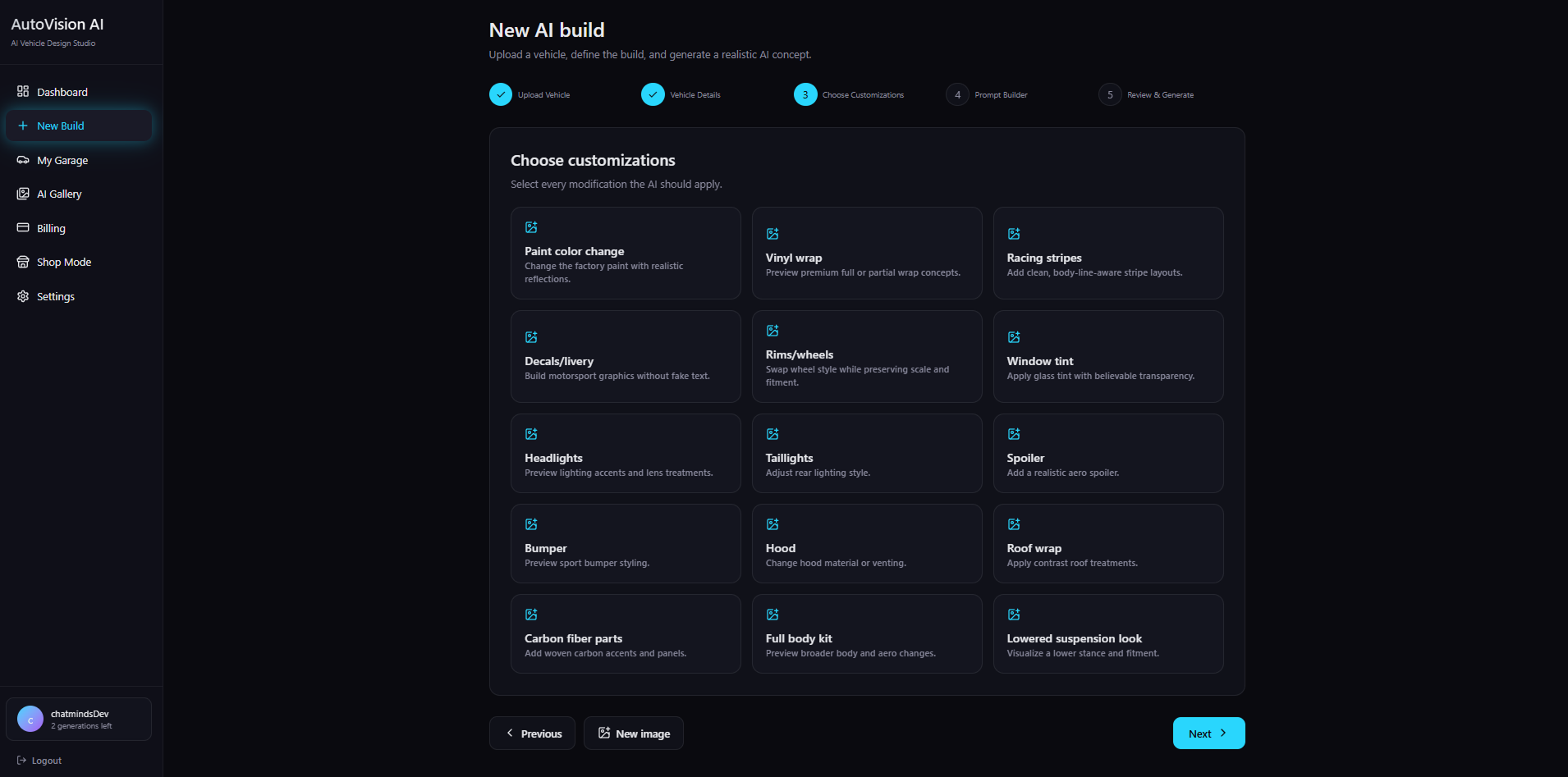
Step 3
Structured modification categories reduce ambiguity while still allowing broad creative exploration.
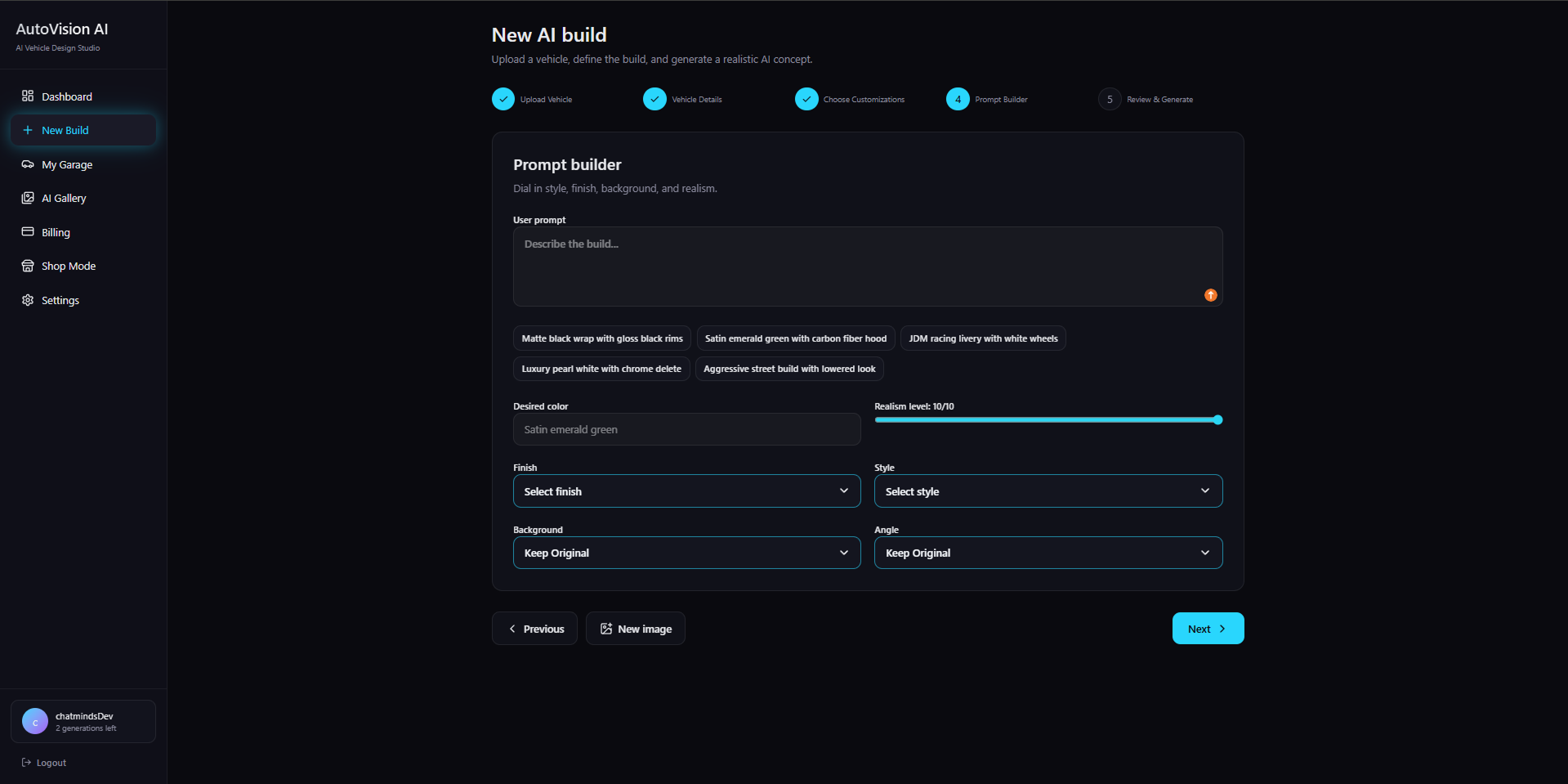
Step 4
Freeform description works with guided controls, examples, and realism cues to reduce blank-state friction.
Step 5
The final checkpoint helps users confirm inputs, understand credit usage, and generate with confidence.
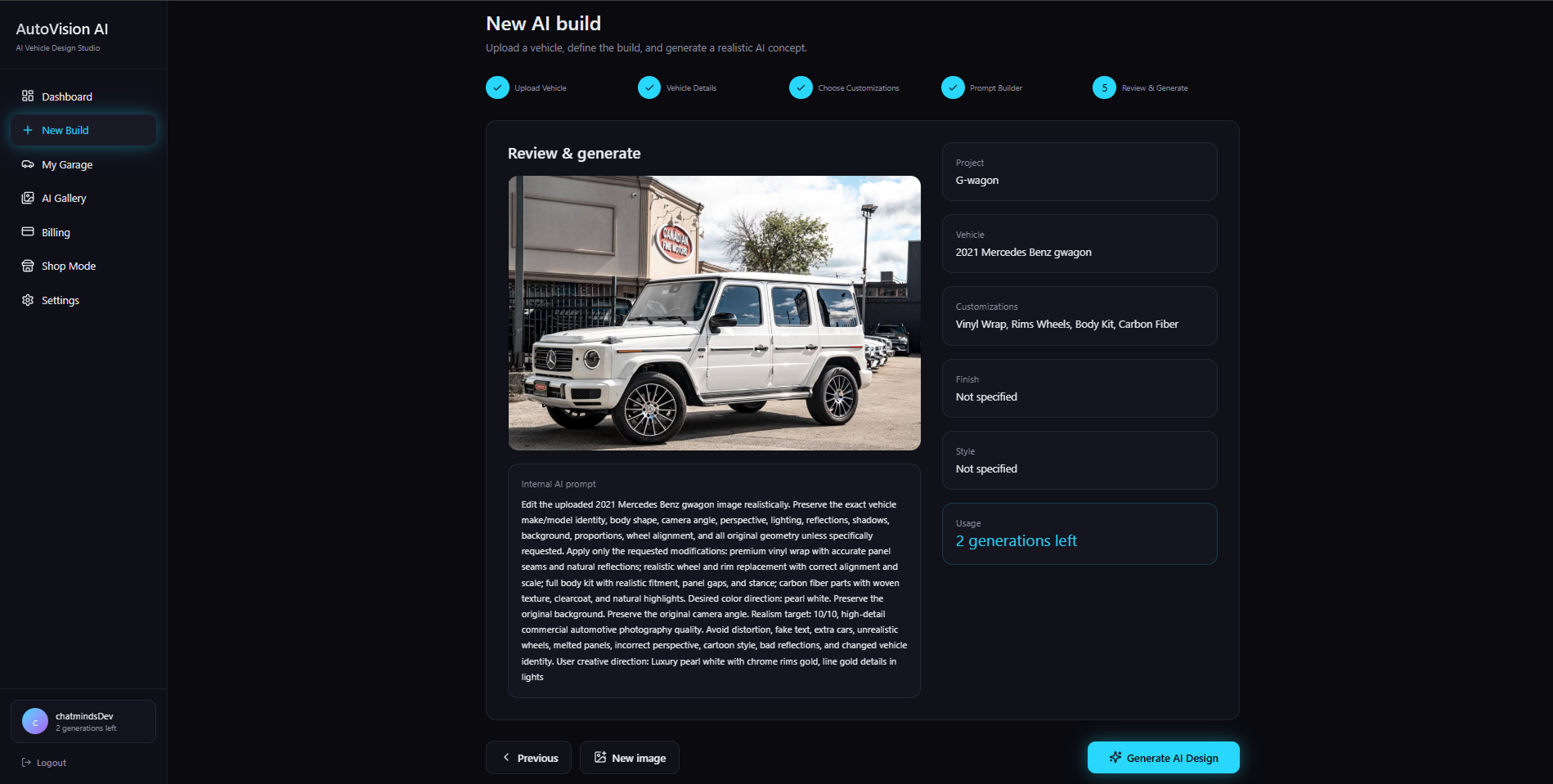
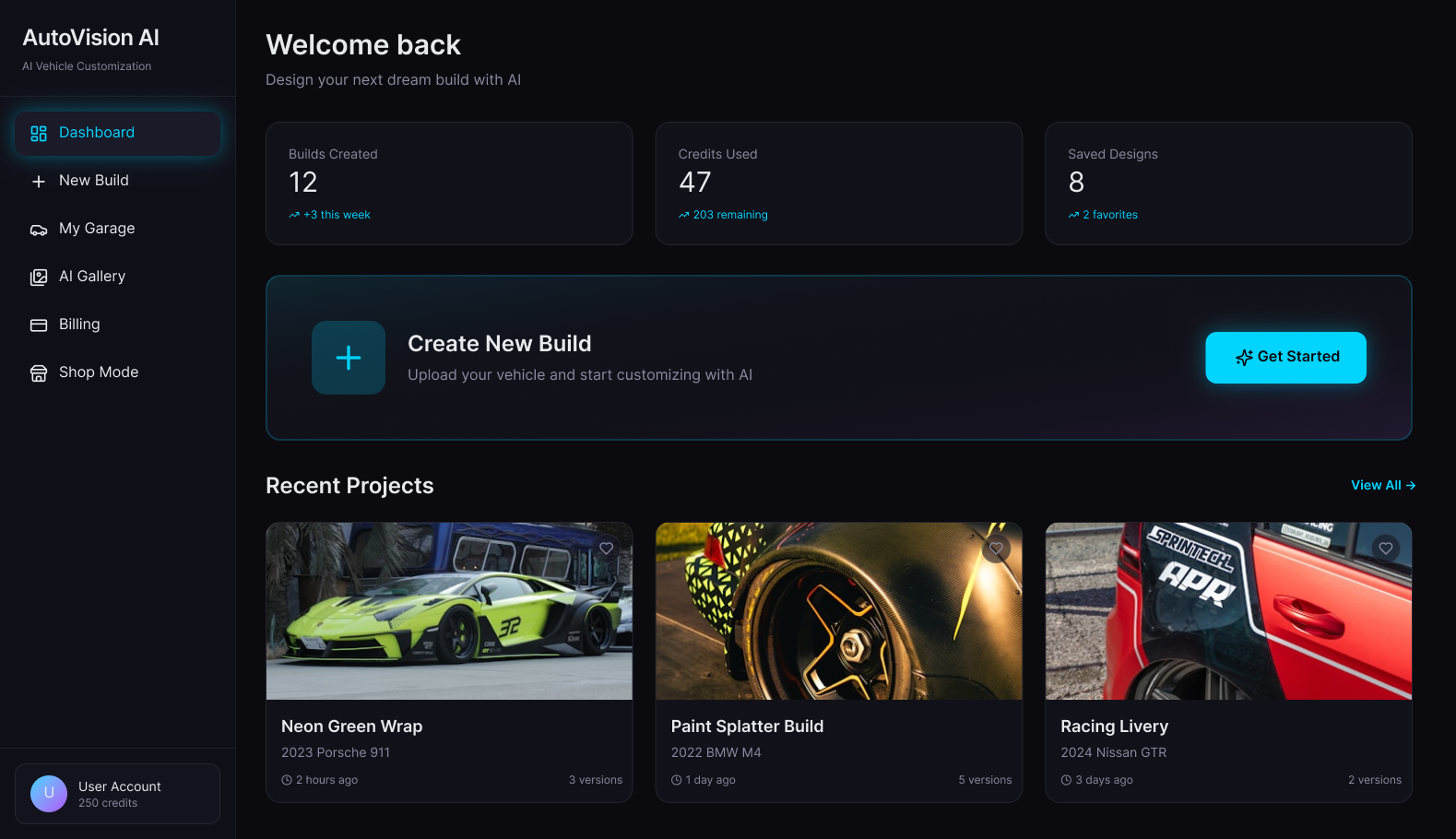
The dashboard gives users a clear operating center for new builds, credits, saved designs, and recent projects. The primary CTA stays visible because the most important action is starting a new vehicle concept.
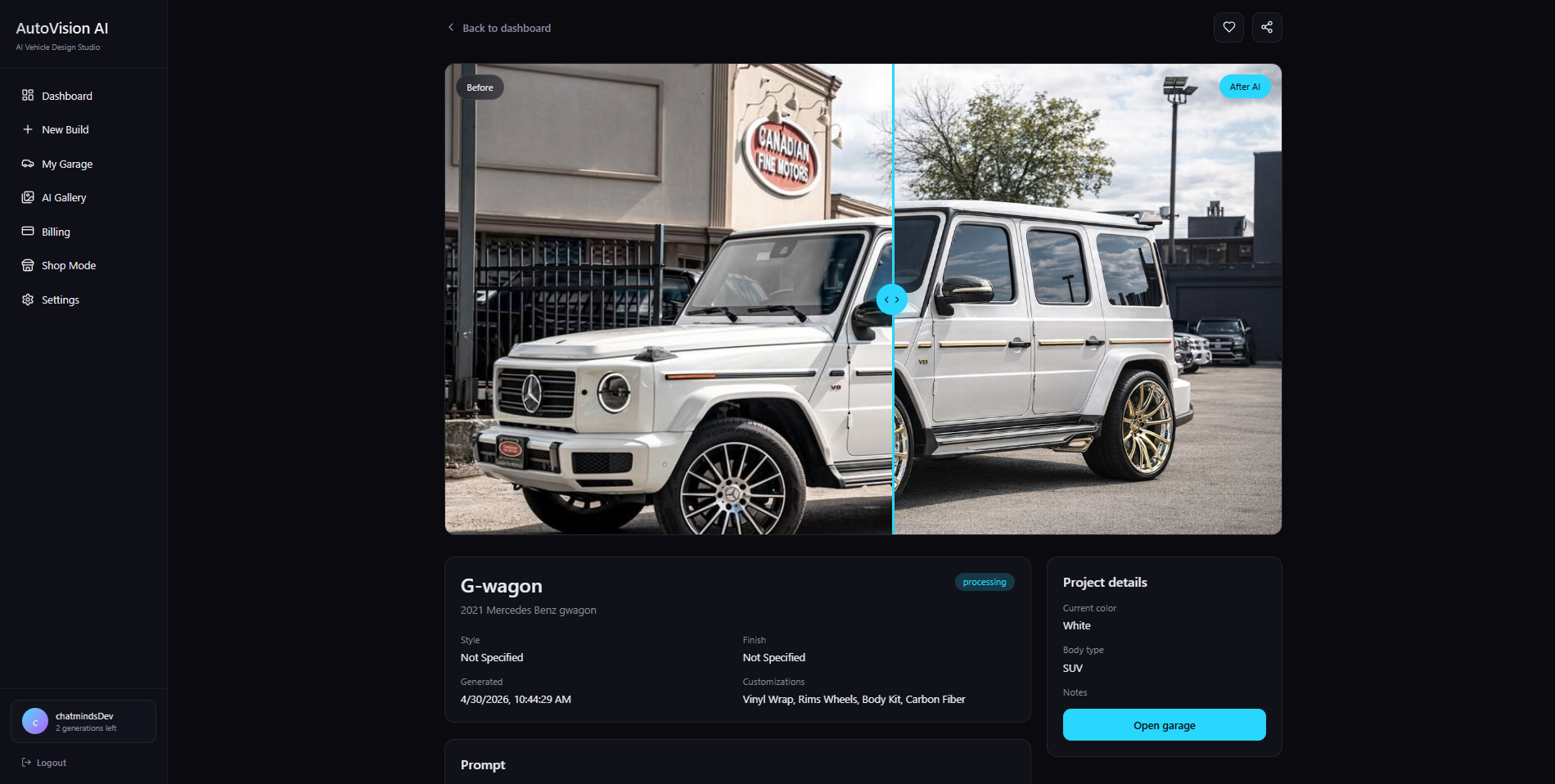
The result view is the flagship moment. Users can compare the original vehicle with the generated concept, review project details, and understand which prompt created the output.
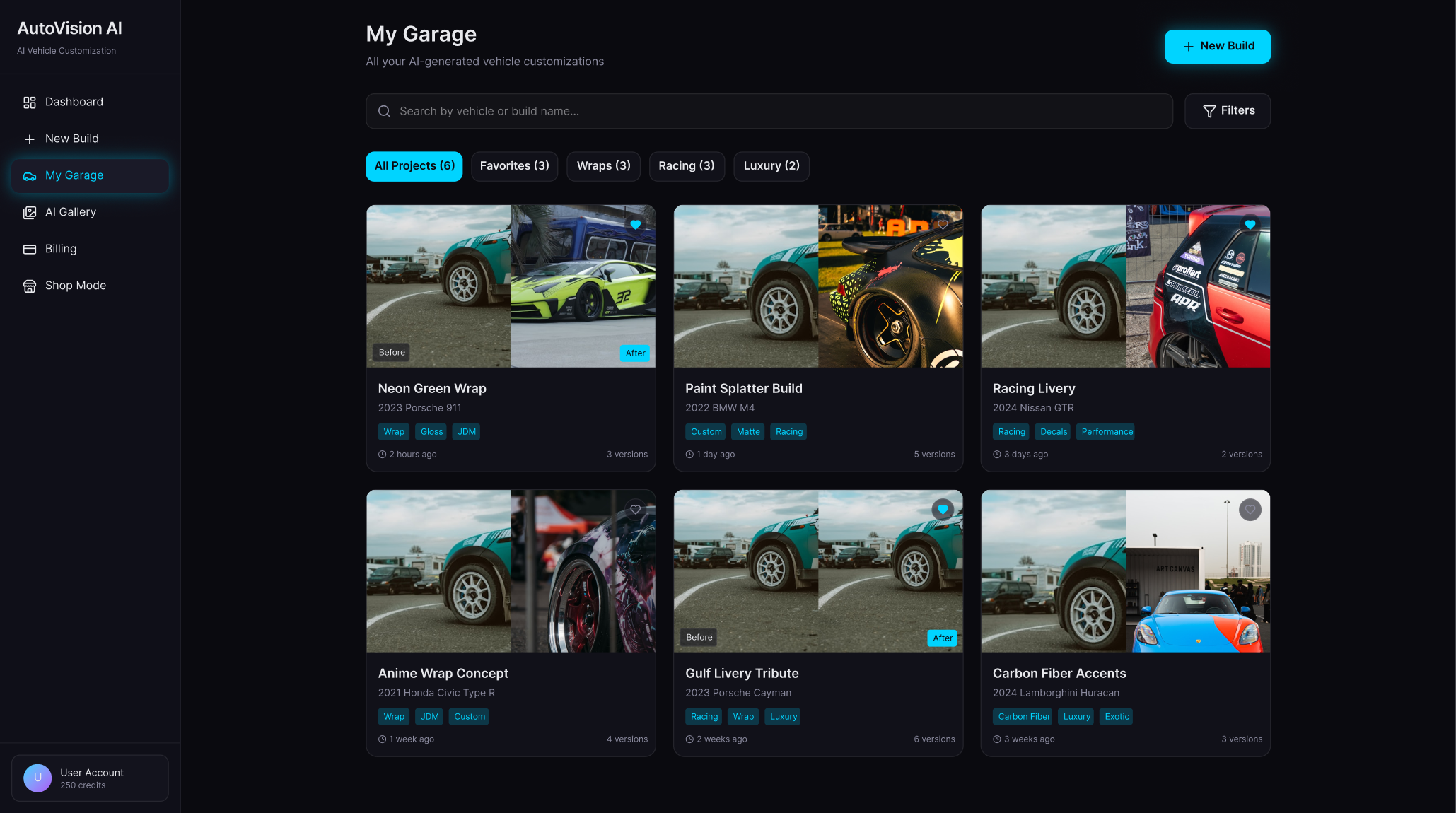
My Garage organizes saved concepts into a browsable library. It supports iteration, history, and retrieval for users who want to compare builds over time.
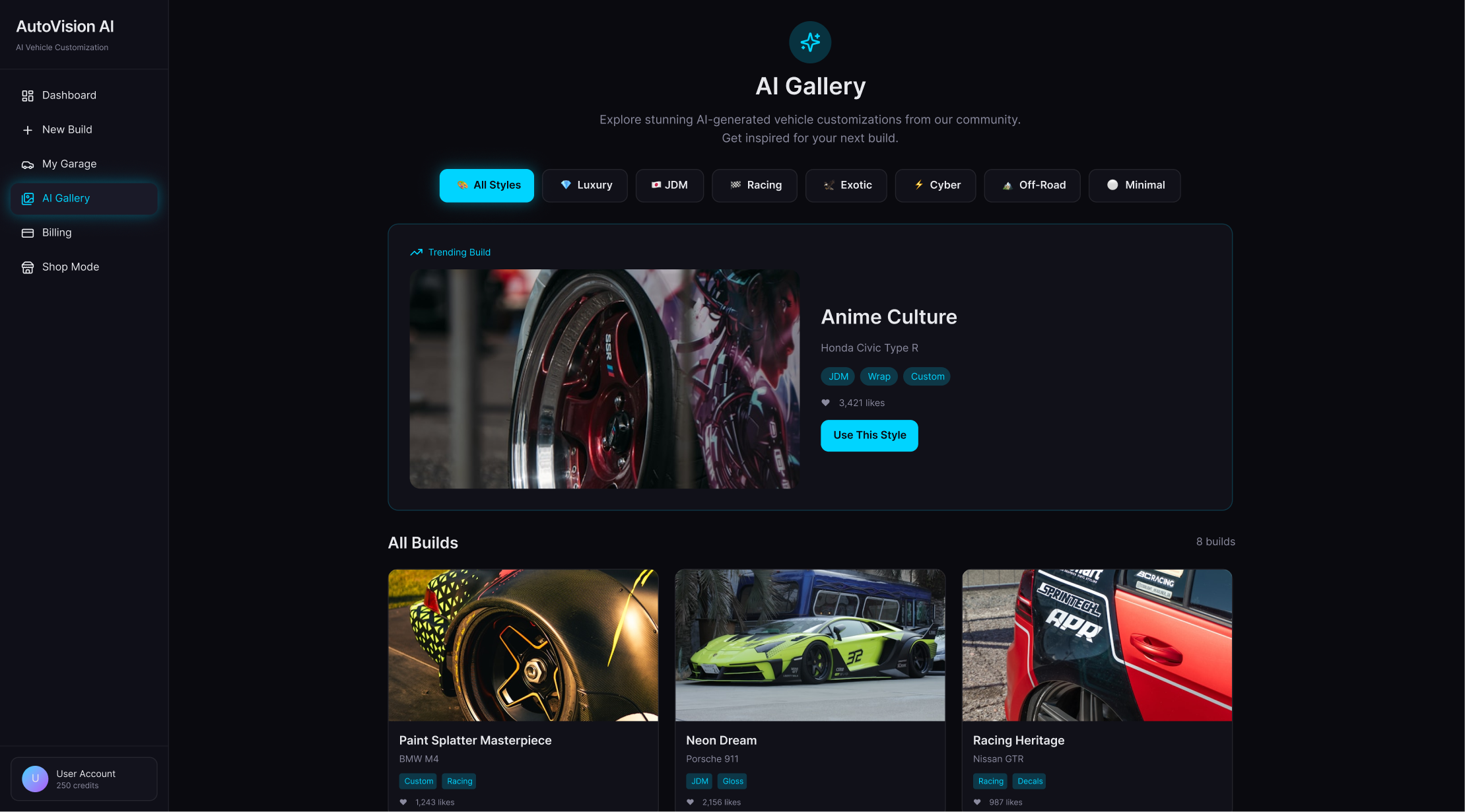
The gallery turns inspiration into a product loop. Users can browse generated styles, discover trends, and use visual references to shape their own prompt decisions.
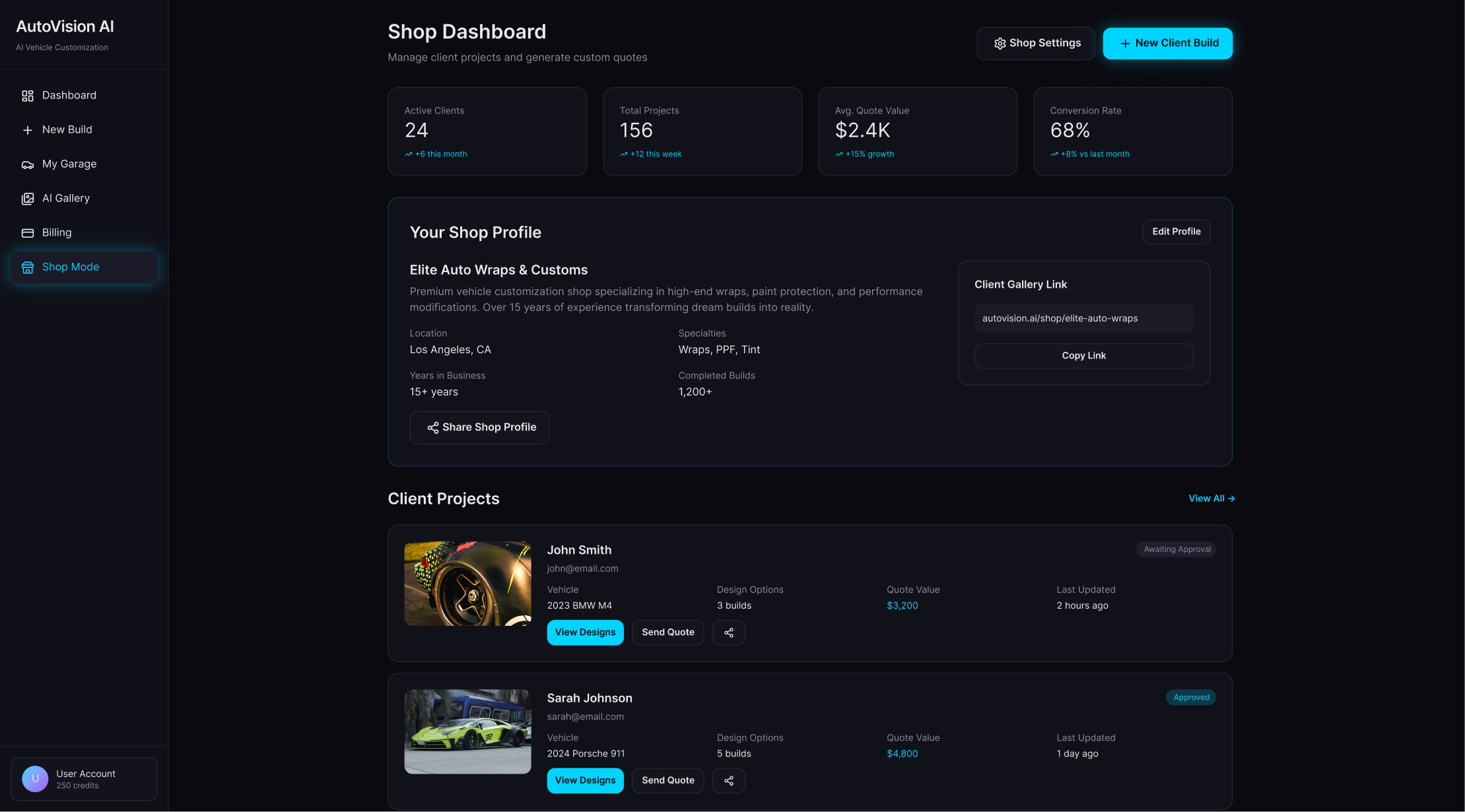
Shop Mode extends the product into a B2B workflow for client projects, quote conversations, business profiles, and service conversion.
UX strategy
The experience is built around progressive disclosure. Users start with familiar inputs, then move into more advanced controls only when they have enough context.
A guided wizard replaces a large freeform setup screen so users can focus on one decision at a time.
Vehicle imagery is treated as the core interface object because the product value depends on visual confidence.
Cards, tags, filters, and status chips make dense SaaS information easy to scan.
Side navigation gives the product a familiar dashboard structure for both individual and business users.
The visual language balances creative aspiration with operational clarity.
Image-heavy layouts use consistent framing so the product feels premium without becoming noisy.
Prompt-builder UX
The goal was to help non-expert users get realistic outputs without needing advanced prompting skills. Structured controls provide reliability, while freeform text preserves creative direction.
Structured inputs define color, finish, style, angle, realism level, background, and customization categories.
Freeform description gives enthusiasts room to describe a specific build without forcing them into rigid templates.
Prompt examples help users start faster and understand what a useful request looks like.
Vehicle-preservation guidance keeps the AI focused on the user's actual car, not a different model or fantasy render.
Review states make the prompt visible before generation so users can understand and improve their results.
Visual design system
The system uses black and charcoal surfaces, electric blue accents, restrained glow, compact typography, and reusable modules to match premium automotive expectations while keeping the product operational.
Carbon
Charcoal
Electric blue
Signal blue
Mist
Slate
Dark premium theme
Black and charcoal surfaces
Electric blue accents
Subtle glow and contrast
Modern typography
Reusable cards
Stepper components
Dashboard side nav
Tags and status chips
Comparison modules
Form controls
Strong spacing and alignment
Accessibility and usability
Because the product combines AI, automotive terminology, image generation, galleries, credits, and business tools, usability depends on clear hierarchy and predictable patterns.
Clear hierarchy supports quick scanning across dashboards, forms, and gallery layouts.
Readable typography and strong contrast keep dense information usable in a dark interface.
Guided steps reduce cognitive load by separating upload, vehicle details, customization, prompt, and review.
Labels, chips, filters, and navigation states clarify what is selectable, active, or complete.
Touch-friendly controls support future mobile and tablet use in garages, shops, and consultation environments.
Business model
The product can start with enthusiasts generating personal previews, then expand into professional shop workflows where saved projects, client reviews, and quote conversion create deeper value.
Limited credits, personal projects, gallery browsing, and a low-risk way to test vehicle previews.
More generations, higher-quality outputs, saved build libraries, advanced prompt controls, and sharing.
Shop seats, client builds, quote context, branded project galleries, usage tracking, and consultation tools.
Outcome and impact
AutoVision AI is designed to help users make clearer customization decisions and help shops communicate concepts with less manual effort. From a product design perspective, the strongest opportunity is turning AI output into a trusted decision-making experience.
Clearer customization decisions through realistic before/after previews.
Better consultation workflow for shops that need fast visual concepting.
Higher engagement potential through saved garages, galleries, and iteration history.
A more scalable workflow than manual mockups or one-off design requests.
A product direction that blends utility, aspiration, and premium SaaS UX.
Reflection: the project reinforced that AI product design is not only about powerful generation. The design work is in shaping inputs, building trust in outputs, and giving users a clear next action after the image is created.
Next steps
The next phase would extend AutoVision AI from a generation dashboard into a collaborative sales and customization workspace for shops and clients.
AI video previews for rolling shots, lighting changes, and walkaround concepts.
Mobile-first flow for users capturing vehicle photos from a garage or parking lot.
Quote request integration for wrap, paint, tint, wheel, and body kit services.
Collaborative shop/client feedback with comments, approvals, and selected versions.
Personalized style recommendations based on vehicle type, budget, and saved inspiration.
Business analytics for quote conversion, popular styles, and credit usage.
Advanced preset templates for track builds, luxury wraps, overland kits, and show-car concepts.